
Dashline · Tools
Dash Cam Field of View: See What Your Camera Really Covers
Manufacturers print one big number on the box. This free visualizer turns any dash cam’s advertised field of view into the coverage you actually get on the road — the real horizontal angle, how wide the scene is ahead of you, and the blind wedges to your sides.
Try the visualizerScene around you captured
34%
Real horizontal angle
≈ 123°
Width at 10 m
36.8 m · 121 ft
Road covered
10.1 lanes
Angular coverage, not to scale. The drawn cone uses the real horizontal angle — narrower than the number on the box.
~80%
A dash cam’s real horizontal coverage is only about 80% of the advertised diagonal number.
~40%
A single front camera captures roughly 40% of the scene around your car. The rest is behind and beside you.
140–160°
The advertised sweet spot most owners settle on: wide context without wrecking edge detail.
The diagonal trap
The number on the box is measured the flattering way
Field of view can be measured three ways — diagonally (corner to corner), horizontally (left to right), or vertically. Almost every dash cam is sold on its diagonal figure, because that is the largest of the three.
The coverage you care about while driving is the horizontal spread across the road. It runs about 80% of the diagonal, so a lens sold as 170° sees closer to 140° across. That is not a marketing lie, just a measurement choice — but it is why two cameras with the same headline number can frame the road very differently. Our guide to dash cam field of view walks through why.
170° → ~140°
Diagonal vs horizontal
The slider above shows both: you set the advertised diagonal, the readout gives the real horizontal angle the geometry actually delivers.
The math, shown
No black box — here is exactly how it computes
- Real horizontal angle is estimated at ~82% of the advertised diagonal — a rough figure; your lens projection may differ.
- Scene width is the span the lens takes in on a flat plane at the distance you pick, straight ahead.
- Lanes covered assumes a 3.65 m lane (UK motorway standard; US interstate is 3.7 m).
- Scene around you is the horizontal angle (doubled for front + rear) as a share of a full 360°.
- These are geometry estimates for any dash cam. Real usable detail depends on resolution, distance, and light.
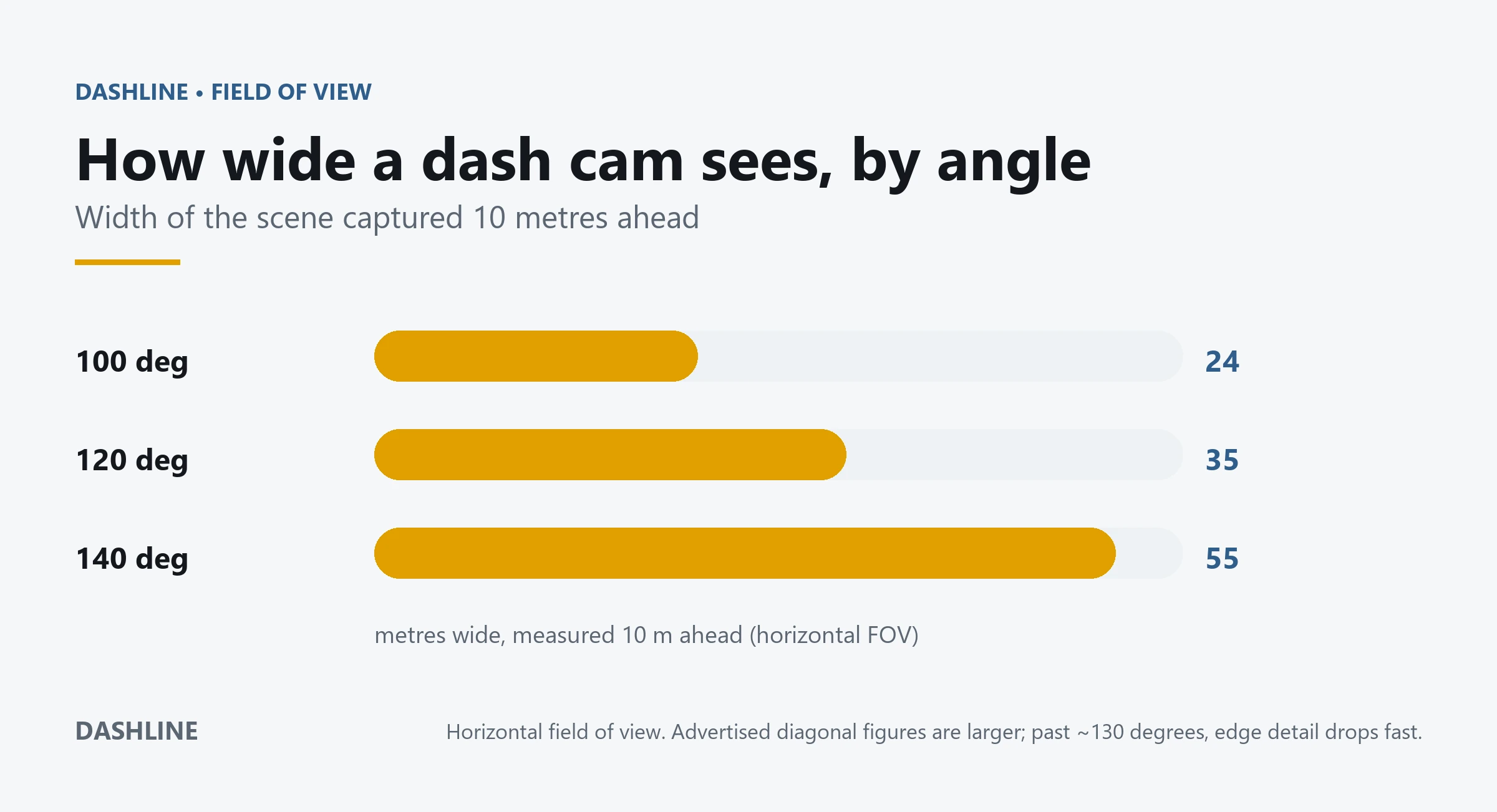
Wider means wider
How much the scene grows with the angle
Every extra degree of horizontal angle spreads the same sensor over more road. The width climbs fast — but so does the distortion at the edges, where a number plate turns to mush.
The numbers, sourced
Field of view, translated
| Advertised (diagonal) | Real horizontal | Scene width at 10 m | Best for |
|---|---|---|---|
| 120° | ≈ 98° | ≈ 23 m | Sharpest detail; focused on the lane ahead |
| 140° | ≈ 115° | ≈ 31 m | Balanced — the common owner’s choice |
| 160° | ≈ 131° | ≈ 44 m | Wide context; catches side cut-ins |
| 170° | ≈ 139° | ≈ 53 m | Maximum context; softest, most distorted edges |
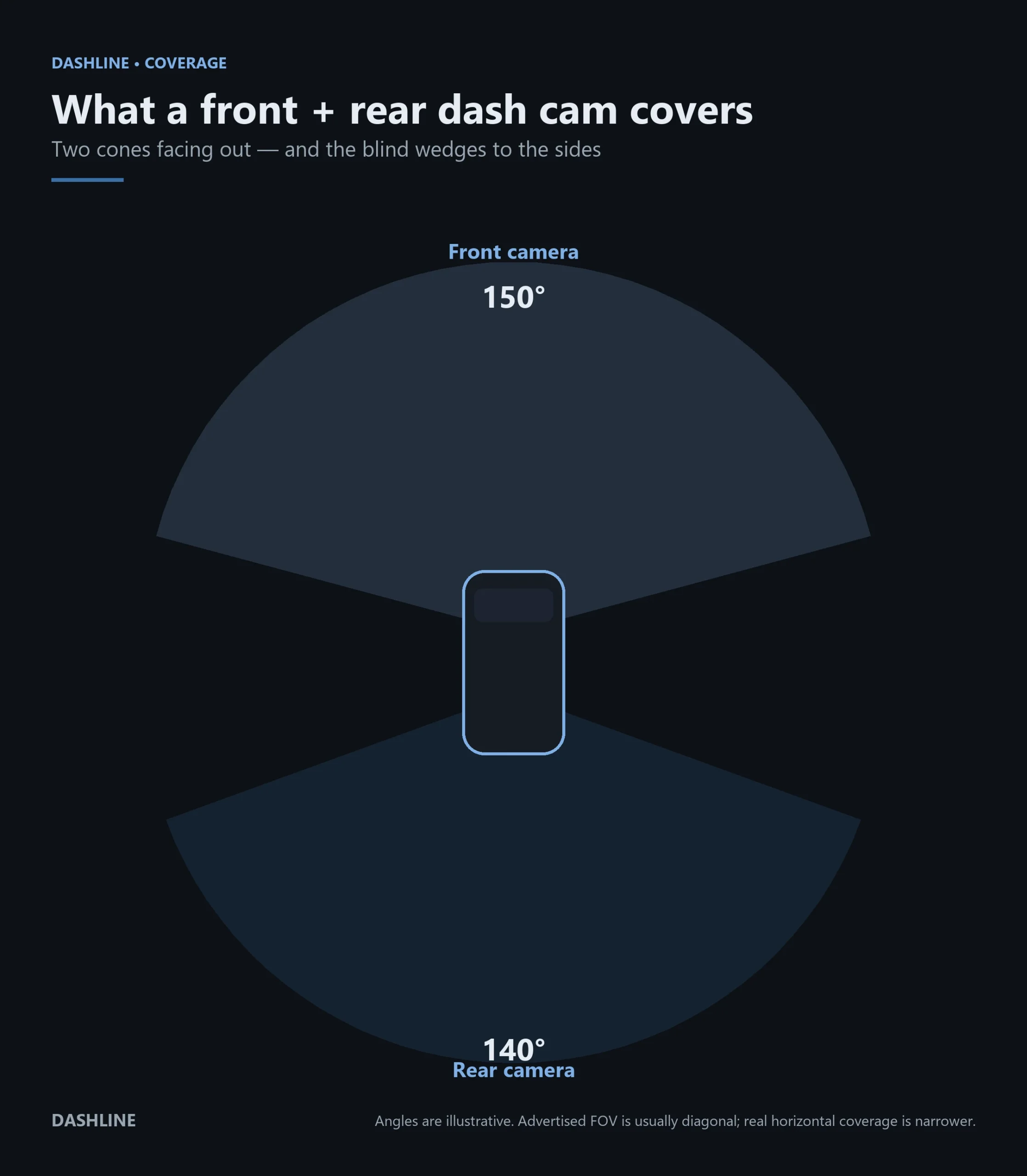
Front + rear
Two cones cover more — the sides still don’t
Adding a rear camera gives you a second cone facing back, so a front + rear setup captures far more of what happens around the car. But look at the gap: the immediate left and right sit between the two cones, in a wedge neither lens can see. Our front and rear dash cam guide covers how the two channels work together.
Read your own coverage
Three steps to size up any camera
Find the advertised angle
Check the box or spec sheet for the field of view. If it just says a single number, it is almost always the diagonal.
Set it in the slider
Enter that number above. The readout converts it to the real horizontal angle and the scene width at 5, 10, or 20 metres.
Judge the trade
Wider fills the frame with context; narrower keeps plates readable. Match the angle to what you most need to prove, not the biggest number.
What it can’t see
Where every dash cam is blind
Your immediate left and right
A forward camera points down the road. A car scraping your door from directly beside you falls outside the cone — even at 170 degrees.
Detail at the far edges
Wide lenses stretch the scene at the sides. A plate that is sharp dead ahead can be unreadable at the frame’s edge. Wider coverage is not the same as more evidence — see our plate read-distance tool.
Straight up and down
Field of view is mostly a horizontal story. Overhanging signs, high mirrors, or a low bumper tap can sit above or below the frame.
Coverage ≠ usable footage
Geometry says the light reaches the sensor. Whether it resolves into readable detail still depends on resolution, distance, speed, and light.
Cite this page
Use these figures? A link is appreciated.
Dashline. “Dash Cam Field of View: See What Your Camera Really Covers.” Retrieved from dashlinecameras.com/dash-cam-field-of-view-calculator.
Questions
Dash cam field of view, answered
What field of view do I actually need on a dash cam?
Why is the real field of view narrower than the advertised number?
Does a dash cam see out of the side windows?
Is a wider dash cam always better?
How wide does a 170 degree dash cam see at 10 metres?
Does this tool work for any dash cam?
Built by Dashline
A 170° front lens, honest about what it covers
The Dashline 4K uses a wide front lens for context and a rear channel for the road behind — and we are upfront about the blind sides no dash cam escapes. Subscription-free, footage stored on your own card.
View the Dashline 4KFree tool by Dashline. Use it for any camera — no sign-up, no data collected.
Leave a Reply