
Dashline Tools · Free calculator
Dash Cam Storage & Recording-Time Calculator
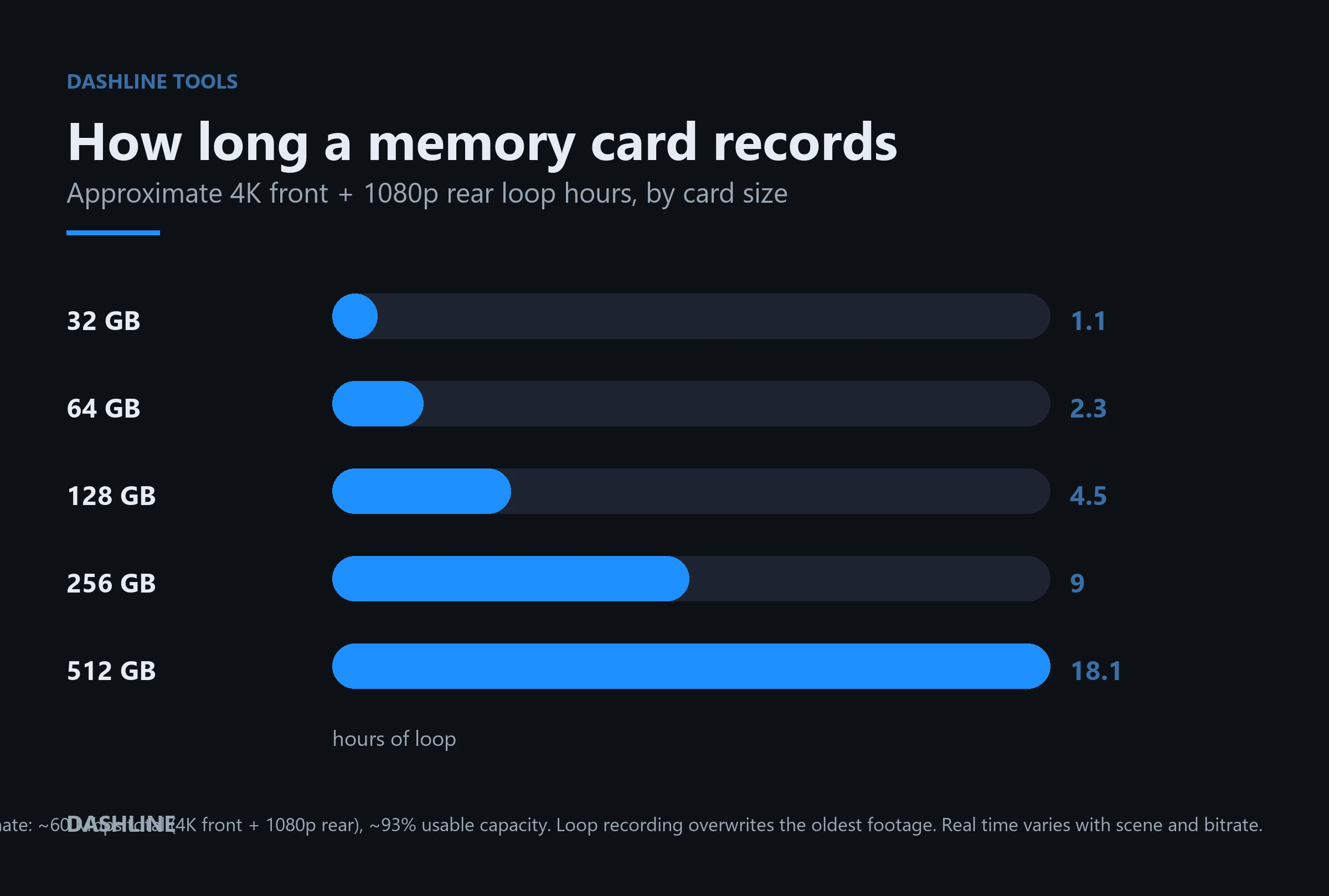
This free dash cam storage calculator estimates your recording time: pick your resolution, card size, cameras and parking mode to see how many hours of footage a microSD card holds before loop recording overwrites it.
Approximate. Loop recording overwrites the oldest footage, so a dash cam never “runs out” — this is how much it keeps before looping. Real time varies with scene, motion and bitrate.
It loops, it doesn’t fill up
When the card is full the camera records over the oldest clip. The number above is how much it keeps before that point.
Bigger card = longer history
A larger card holds more hours, so you have more time to save a clip before it’s overwritten — it doesn’t improve quality.
Match it to your habits
If you only check footage after an incident, size for at least a day or two of driving so nothing important loops away first.
The math, shown
How recording time is calculated
Recording time is just card capacity divided by how fast footage is written (the bitrate). Higher resolution and extra cameras write more data per second, so they fill a card faster:
hours ≈ (card GB × 0.93 usable × 8192) ÷ total Mbps ÷ 3600
| Resolution | Typical bitrate* | 128 GB, front only |
|---|---|---|
| 4K (2160p) | ~45 Mbps | ~6 hours |
| 2.5K (1440p) | ~24 Mbps | ~11 hours |
| 1080p | ~15 Mbps | ~18 hours |
| 720p | ~8 Mbps | ~34 hours |
*Bitrates are typical figures from manufacturer specifications and dash cam testing communities such as DashCamTalk; real dash cams use variable bitrate (VBR), so busy night scenes write larger files than an empty daytime road. A rear 1080p channel adds ~15 Mbps. Figures are estimates, not a guarantee. For more on sizing a card, see how to install a dash cam.
Quick guidance
What size card should you get?
Daily commuter
64–128 GB
A short commute generates only a few hours a day. 128 GB keeps roughly a day or two of 4K front+rear before looping.
Rideshare / long days
128–256 GB
Many hours behind the wheel, often with a rear or cabin channel. 256 GB buys margin so a busy shift doesn’t loop over an early incident.
Road-tripper
256 GB+
Full days of continuous 4K add up fast. A larger card means you can review a whole leg of the trip before it’s overwritten.
Parking mode 24/7
256–512 GB
Watching the car while parked shares the same card. Size up — and use a high-endurance card plus hardwiring for continuous use.
Keep it honest
What changes your real recording time
Scenes aren’t equal (VBR)
Cameras use variable bitrate: rain, traffic, night and motion write bigger files than an empty road, so real hours swing around the estimate.
Loop overwrites — back up fast
Once the card is full the oldest clips are gone. After an incident, save or lock the clip before it loops away.
Parking mode shares the card
Time-lapse or motion clips while parked use the same storage. Triggered clips are compact, but continuous parking eats into drive footage.
Speed class & card health
4K needs a U3 / V30 card to keep up. Cards also wear out — a high-endurance card built for dash cams lasts far longer than a phone card.
Cite this page
Writing about dash cam storage, microSD sizing or recording time? You’re welcome to link to or quote this calculator — a citation helps readers find the working tool.
Dashline. “Dash Cam Storage & Recording-Time Calculator.” dashlinecameras.com/dash-cam-storage-calculator/
Embed this calculator
Run a blog, forum or resource page? Add this free calculator to your site — paste the snippet below wherever you want it to appear. It stays up to date automatically and credits the source.
Preview
Free tool
Dash Cam Storage & Recording-Time Calculator
Work out how many hours of footage a dash cam records on a 32–512 GB card at any resolution and bitrate.
Open the calculator →Calculator by Dashline
Quick answers
Dash cam storage: common questions
How many hours does a 128 GB dash cam record?
Roughly 4–6 hours at 4K front+rear, about 18 hours at 1080p front only. It then loops and records over the oldest footage. Use the calculator above for your exact setup.
What size memory card do I need for a 4K dash cam?
128 GB is a sensible minimum for 4K so you keep a day or two of driving; 256 GB+ if you drive long hours or use parking mode. Always a U3 / V30 high-endurance card.
Will my dash cam run out of space?
No — dash cams use loop recording, so when the card fills they overwrite the oldest clip and keep going. The card size just sets how much history you keep before that happens.
Does parking mode use up the card?
Yes, parking clips share the same card. Motion- or impact-triggered clips are compact, but continuous or time-lapse parking recording reduces how much drive footage you keep. Size up if you park-monitor often.
How is the recording time calculated?
Capacity (about 93% usable after formatting) divided by the total bitrate of all active camera channels. Higher resolution and extra cameras raise the bitrate, so the card fills faster. Figures are estimates because real bitrate varies by scene.
From the team that built this tool
Dashline makes a premium 4K dash cam
A native 4K front sensor, optional 1080p rear, GPS and parking mode — with a memory card included in the box, sized 32 to 128 GB. Our calculator works for any dash cam; the camera is ours.
See the Dashline 4K dash cam →
Leave a Reply